Members Helping Members help Buying a non Pontiac item, transportation help, Handy-man advice, directions, vacation ideas, places to dine, ebay and generally anything you think might help other members.

          
Reply
 
Thread Tools Display Modes
  #1  
Old 03-23-2012, 09:18 PM
gman26 gman26 is offline
Chief Ponti-yacker
 
Join Date: Jul 2005
Location: socal
Posts: 705
Default No internet access on Sony VAIO laptop

I have a W7 64bit notebook, it gets a wireless connection, signal strength excellent, however, no internet connection. I went through all the settings I could think of, still nothing.

Any ideas?

  #2  
Old 03-23-2012, 09:50 PM
fiedlerh's Avatar
fiedlerh fiedlerh is offline
Ultimate Warrior
 
Join Date: Feb 2002
Location: Illinois
Posts: 2,262
Default

What type of security? (none, WEP, WPA-2 Personal, etc..)
Do you need to enter your password or encrypted password?
You've been through all the options on the wireless signal strength icon on the bottom right of the screen?

__________________
http://www.pontiacpower.org/
  #3  
Old 03-23-2012, 09:54 PM
gman26 gman26 is offline
Chief Ponti-yacker
 
Join Date: Jul 2005
Location: socal
Posts: 705
Default

Quote:
Originally Posted by fiedlerh View Post
What type of security? (none, WEP, WPA-2 Personal, etc..)
Do you need to enter your password or encrypted password?
You've been through all the options on the wireless signal strength icon on the bottom right of the screen?
WPA-2 security, I enter the password, signal strength shows good.
I tried all the options on the icon, still nothing.

  #4  
Old 03-23-2012, 10:07 PM
fiedlerh's Avatar
fiedlerh fiedlerh is offline
Ultimate Warrior
 
Join Date: Feb 2002
Location: Illinois
Posts: 2,262
Default

Are you entering the router password as you typed it, or the encrypted password the router generated? May not be your problem, but this threw me at first.

Did you run the troubleshooter by right clicking on the signal strength icon?

__________________
http://www.pontiacpower.org/
  #5  
Old 03-23-2012, 10:40 PM
gman26 gman26 is offline
Chief Ponti-yacker
 
Join Date: Jul 2005
Location: socal
Posts: 705
Default

I'm typing the password I setup, when I configured the router. Is there another password to enter?

  #6  
Old 03-23-2012, 10:41 PM
gman26 gman26 is offline
Chief Ponti-yacker
 
Join Date: Jul 2005
Location: socal
Posts: 705
Default

The troubleshooter doesn't come up with any issues.

  #7  
Old 03-23-2012, 11:24 PM
fiedlerh's Avatar
fiedlerh fiedlerh is offline
Ultimate Warrior
 
Join Date: Feb 2002
Location: Illinois
Posts: 2,262
Default

With some security schemes the router generates an encrypted password (looks like a random string of letter and numbers). You can go into you router setup pages to find it, if it did indeed generate one. Try entering that into your computer.

I'm assuming you have been through the stuff at Control Panel\Network and Internet\Network and Sharing Center
and you can see your router on the computer and it simply won't connect.

__________________
http://www.pontiacpower.org/
  #8  
Old 03-24-2012, 01:28 AM
mzbk2l's Avatar
mzbk2l mzbk2l is offline
Ultimate Warrior
 
Join Date: Jun 2003
Location: AZ, at the foot of Superstition Mountain
Posts: 1,208
Default

gman, are you saying you CAN connect to the wireless router but cannot go out to the internet, or you can see the wireless router signal but cannot connect to it?

If it's the first, that doesn't sound like a computer problem; it sounds like a router or cable modem or ISP problem. If it's the second, what troubleshooting steps have you done?

Based on the fact that you're here posting, I see you're getting online somewhere. Do you have other computers connecting through that same router?

Have you tried connecting through the same router with an ethernet cable instead of wireless, just as a troubleshooting step?

__________________
Mike
  #9  
Old 03-24-2012, 05:01 AM
02Hawk's Avatar
02Hawk 02Hawk is offline
Ultimate Warrior
 
Join Date: May 2003
Location: Edmonton Alberta Canada
Posts: 1,348
Default

I have the same issue with my ipad and playbook....when I clear or delete "history" on the desk top that is wired to the router it lets the other devices "connect"....dont know why it does that ...it just does

__________________
24 beer in a case. 24 Hours in a day. Coincidence? I think not. " Steve Wright"
  #10  
Old 03-24-2012, 11:27 AM
gman26 gman26 is offline
Chief Ponti-yacker
 
Join Date: Jul 2005
Location: socal
Posts: 705
Default

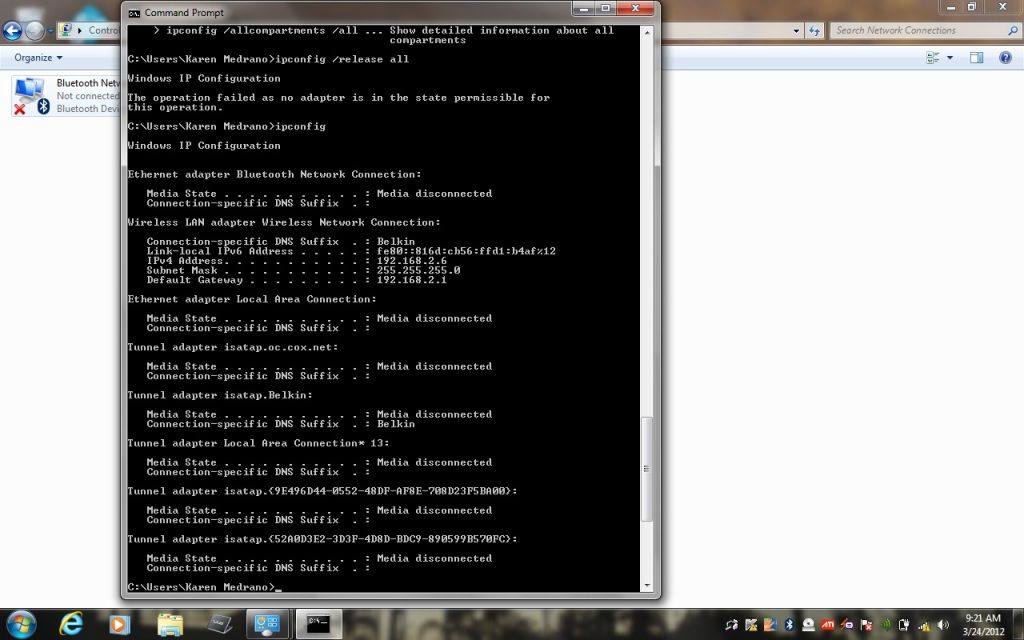
Here's some screenshots - I was able to copy them to my phone and upload to photobucket. I do have another computer at home, running wired and wireless.


  #11  
Old 03-24-2012, 03:35 PM
ponjohn's Avatar
ponjohn ponjohn is offline
Ultimate Warrior
 
Join Date: Mar 2002
Location: Fort Myers, Fl.
Posts: 9,717
Default

Make sure the WiFi switch near the mouse pad didn't get turned off...ask me how I know.

  #12  
Old 03-25-2012, 03:05 AM
gman26 gman26 is offline
Chief Ponti-yacker
 
Join Date: Jul 2005
Location: socal
Posts: 705
Default

The WiFi switch is on, and it shows its Connected to the wireless router.

  #13  
Old 03-25-2012, 03:37 AM
andyg's Avatar
andyg andyg is offline
Chief Ponti-yacker
 
Join Date: Nov 2007
Location: Deltona Florida
Posts: 501
Send a message via AIM to andyg
Default

Your router has something wrong with it or your internet connection does. Have you plugged the ethernet cable into the computer directly to make sure that works?

__________________
1969 GTO. Full rotisserie restoration "completed" in 2014. 5.3L "LM7", TKO600, 3.55's out back. Big cam coming soon.

  #14  
Old 03-25-2012, 10:46 AM
gman26 gman26 is offline
Chief Ponti-yacker
 
Join Date: Jul 2005
Location: socal
Posts: 705
Default

Quote:
Originally Posted by andyg View Post
Your router has something wrong with it or your internet connection does. Have you plugged the ethernet cable into the computer directly to make sure that works?
Yes, internet here works. I know the wireless works, I'm connected to a Toshiba tablet.
I also checked the word connection on the laptop and it works fine.

I read something that says I may need to restore the operating system. Just didn't want to take that step yet.

  #15  
Old 03-25-2012, 03:49 PM
bastard's Avatar
bastard bastard is offline
Chief Ponti-yacker
 
Join Date: Apr 2006
Location: Arkansas
Posts: 648
Default

Turn it off and then back on.
If that doesn't work, disconnect from that network and attempt to connect again.
If that doesn't work attempt to connect that machine to a different wireless network. If it will connect to a different wireless network, try rebooting the modem and wireless router and attempt to connect again. When you power back up, plug in the modem first and let it sit for a couple of minutes, then plug in the router and let it sit for a few minutes, then try to connect the computer again.
I wouldn't recommend reinstalling Windows. If the above does not work, next I would consider reinstalling drivers and starting over, but redoing Windows will most likely be a waste of your time.

__________________
  #16  
Old 03-26-2012, 04:26 AM
mzbk2l's Avatar
mzbk2l mzbk2l is offline
Ultimate Warrior
 
Join Date: Jun 2003
Location: AZ, at the foot of Superstition Mountain
Posts: 1,208
Default

I got ONE Windows update, one time, shortly after I got my first Windows 7 computer, that caused it to not show internet access like that.

I did a system restore back to a date just before the update (like a week ago or something), and never had the problem again.

I'd also vote for holding off on a full Windows restore until after some of the steps bastard mentioned.

You can also go into "Change Adapter Settings" and disable your wireless, then re-enable it; I've seen that bring up stubborn connections before, although I can't imagine it clears anything more than a release and renew does.

__________________
Mike
  #17  
Old 03-26-2012, 03:04 PM
gman26 gman26 is offline
Chief Ponti-yacker
 
Join Date: Jul 2005
Location: socal
Posts: 705
Default

I have tried all these things mentioned. Turning it off and on, resetting the adapter, updating the device drivers, etc.
There must be something, probably from a Windows update.
Tried rebooting and a hard reset o the wireless router. The wireless router works with other devices, so it should be good.

  #18  
Old 03-26-2012, 04:52 PM
bastard's Avatar
bastard bastard is offline
Chief Ponti-yacker
 
Join Date: Apr 2006
Location: Arkansas
Posts: 648
Default

Uninstall the wireless card and all its drivers and updates. Download the latest driver package from the site of the wireless manufacturer.

__________________
  #19  
Old 01-09-2015, 09:45 PM
tooski tooski is offline
Chief Ponti-yacker
 
Join Date: Oct 2010
Location: Thunder Bay, Ontario
Posts: 717
Default Revive

Reviving this thread as I am having this problem presently, and did not see a resolution. Gman26, did you solve your problem?
I have tried all of the suggestions in the thread. I ran a diagnostic and ended up with this message. 'Wireless network has invalid IP configuration'. I am renting a condo for the weekend. I have stayed at various other places and connected to probably 10 or more wifi networks with no problem. The tech guy here is baffled, as his device connected no problem, my wife's I-pad connected no problem. I believe the problem lies with my laptop. Sometimes when I just open up a browser, the problem somehow fixes itself. other times I disable my wireless adapter, then re-enable and problem solved.
Not this time.
Seems to me I have to change the adapter configuration but don't what to change or what to change it to.

__________________
Frank M.
75 Firebird
68 Firebird 400 RAIII
66 Chevy II 461 Pontiac in AZ

Last edited by tooski; 01-09-2015 at 09:45 PM. Reason: puncuation
Reply


Posting Rules
You may not post new threads
You may not post replies
You may not post attachments
You may not edit your posts

BB code is On
Smilies are On
[IMG] code is On
HTML code is Off

Forum Jump


All times are GMT -4. The time now is 01:43 PM.


About Us

The PY Online Forums is the largest online gathering of Pontiac enthusiasts anywhere in the world. Founded in 1991, it was also the first online forum for people to gather and talk about their Pontiacs. Since then, it has become the mecca of Pontiac technical data and knowledge that no other place can surpass.


Copyright © 2017