Afternoon of tinkering told me I have the right idea, but my execution needs some refinement.
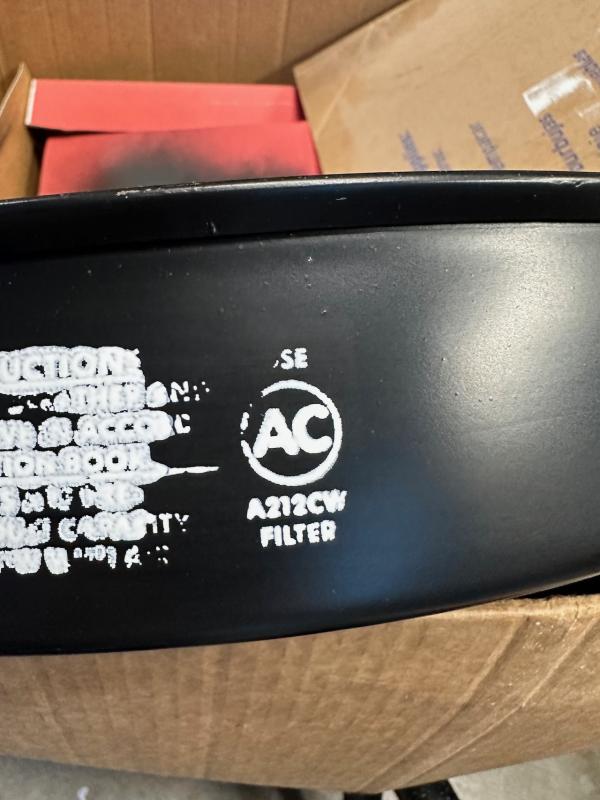
I tried the traditional application method with a squeegee, blotting with a high density sponge, dry brushing the paint on and using it as a mask with spray paint. They all gave pretty much the same result which was blurry and globby text. One time I got a half way acceptable AC logo, but overall what I was doing clearly wasn't working. The good news is the screens are totally resuable and wash off easily with some brake cleaner.
After about 20 attempts, I gave up trying to get a clean pull and did some more research. It turns out I'm using the wrong screen mesh. I'm using screens made for t-shirt printing which are pretty coarse (140). I need a finer screen for the detail and the smooth metal surface - roughly double what I was using (305). I may also need a thicker solvent-based silkscreen ink to prevent bleeding ( I was using Rustoleum enamel), but I think the screen mesh is a bulk of the problem. I now know twice as much about screen printing as I did yesterday.
Back to the drawing board...

__________________
Ken
'68 GTO - 464 - Ram Air II heads - 236/242 roller - 9.5” TSP converter - Moser 3.55 Truetrac (
build thread |
walk around)
'74 Ventura 350
'69 AMC Javelin SST



 Threaded Mode

